Choosing martial arts software is easier when you bring a real school workflow to the demo. A feature list can tell you that belt tracking exists. It cannot tell you how your instructors will use it between classes.
This worksheet helps karate schools, taekwondo schools and jiu-jitsu academies test student records, ranks, attendance and billing with one fictional student. Use sample information instead of real student data. The checks below are questions to demonstrate, not promises that every platform handles them the same way.
Start with one student and one progression
Write down a typical membership, current rank, class schedule and next review date. Choose an example that reflects your school. A children’s karate program may use different progression steps from an adult grappling class. Ask the presenter to build your example rather than relying only on a prepared account.
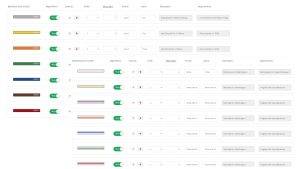
RhinoFit’s martial arts software includes customizable belt and rank tracking. The useful demo question is how that setup maps to your own curriculum and daily administration.
Seven checks for your martial arts software demo
1. Build the rank structure you actually teach
List the belts, stripes or subcategories you use. Ask how to enter them, change a student’s current rank and retain a clear record. If you teach multiple disciplines, ask the presenter to demonstrate that specific requirement.
2. Separate attendance from readiness
Ask to record a class visit and then review the student’s attendance. Decide which attendance information helps your instructors prepare for a rank review. Attendance alone should not decide whether a student is ready to advance. Keep the instructor’s assessment separate from an administrative count.
3. Review test timing
Show your normal review interval and ask how upcoming tests appear to staff. RhinoFit’s published feature description includes test timing and alerts when testing is due. Confirm the settings and what an instructor must still review or enter manually.
4. Walk through a first visit
Use the sample student to check enrollment, a class reservation and the waiver process. Ask how staff find the completed record. If your school enrolls minors, demonstrate your guardian workflow and confirm the available controls before deciding the system fits.
5. Inspect a billing exception
Ask what staff see when a membership payment needs attention. Who reviews it? What does the member receive? Which actions are automatic and which require a person? Confirm processing terms separately from the software subscription.
6. Find progress without rebuilding a spreadsheet
Ask the presenter to locate the sample student’s current rank and review the available progression reports. Check how a second instructor would find the same information. Record any export or reporting limits that matter to your school.
7. Let a staff member repeat the task
After the presenter demonstrates the workflow, ask to repeat one important step. Note confusing labels, extra clicks and training questions. A task that looked easy during a presentation may still need a written procedure for your team.
Copy or print this demo worksheet
Mark each check as Shown, Needs follow-up or Not available. Write the answer and the person responsible for any follow-up. A blank cell means untested.
| Demo check | Status | Notes or next question |
|---|---|---|
| Our belts and subcategories | Untested | Can we model our curriculum? |
| Attendance and instructor review | Untested | What is recorded and where? |
| Upcoming rank tests | Untested | Which settings and reminders apply? |
| Enrollment and waivers | Untested | Can staff find the right record? |
| Membership billing exception | Untested | Who handles the next action? |
| Rank history and reports | Untested | What can staff review or export? |
| Staff practice and support | Untested | What training is needed? |
Choose the first workflow to test
If your team has several priorities, use our one-question gym software demo poll to start the discussion. It is a voluntary RhinoFit poll, not an industry benchmark. For a broader comparison, use the gym software comparison scorecard.
Bring your school workflow to RhinoFit
Use the worksheet during a RhinoFit demo. Bring your rank structure and your biggest administrative question. Ask the team to show the relevant steps, confirm current plan details and identify anything that needs a separate follow-up.